Showing posts with label iOS. Show all posts

Thursday, 5 February 2015

Augmented Reality (AR) - introduction to Aurasma

Have you heard of a really cool app called “Aurasma”? I used to be one the unfortunate souls who had no idea about the magic of Aurasma, until Jim kindly stepped in and enlightened me. So one cold December afternoon Jim calls me into his classroom as he has something to show me. He tells me to point his iPhone at a large drawing of Father Christmas on the wall. I was dumbfounded by what followed, I suspected witchcraft. The drawing came to life as an animated version of Santa popped up on the screen and began singing. After racking my brains, all I could muster was “How?” Jim, looking quite smug my reaction, then proceeded to fill me in on the magic of Aurasma.

The secret to Aurasma is that there are 2 key components; a video overlay and a trigger image. The video overlay can be anything you want, something you have recorded on your phone, any video format created through another app such as SockPuppets or ChatterPix Kids, even record something on the fly directly through Aurasma. Simple. On the other hand, setting up a trigger image can be a little trickier, especially if the resolution on your older phone camera isn’t up to scratch. The app is rather clever and is able to recognise images/drawings/patterns, and can then store them in its memory to be used as a trigger. Through experimentation, and getting fed up with spending more time than I would care to admit waving my iPhone around without much success, larger images with distinct outlines and plenty of colours helps with the recognition process. Having a steady hand doesn’t do any harm either.

Once you have prepared your overlay and set your trigger image, the final step is to combine them. Once you have made an “Aura”, you have the choice of making it private, which will only allow your phone to view your Auras, or public, which will enable followers of your Aurasma profile to access your content, as long as they have your Aura trigger on hand.

Now that you’re up to speed with Aurasma, you might be starting to form some ideas yourself on how to implement it into a learning environment. It was on the forefront of our agenda for a while too, and thanks to a bright spark idea from the man himself (Jim), we found a pretty cool way to show off our students’ work. His idea? Well, what I can tell you that is that you should tune in next week, where I will reveal our big idea to make Luna a truly interactive school. Watch this space! For the time being you can have a sneak preview of one our Auras starring Taisei.


Sunday, 24 August 2014

My favourite possession - my iPod drip!

Ipod touch 2gen
Ipod touch (Photo credit: Wikipedia)
It's got two high quality cameras at the front and back, the one at the back has flash which also can be a flashlight. It's got a big 32GB memory can hold lots of apps, music and photographs. It's got a clear big touch screen.

I like to use it to text chat with friends and family, phone them, send pictures and videos. I also like to listen to my music, take pictures and videos. I can play games, watch videos on YouTube, check quizlet and search for some answers for my homework. I check the weather every day and use it as an alarm clock which has various ringtones. 

I accidentally dropped it in the river last week, so I'm really sad.

Takuro :(

Wednesday, 23 July 2014

Evaluating apps in class - crowd sourcing problems!

Prepping for Successful Meetings
It's not often you get to a class and the students are already doing exactly what you wanted them to do...but that's exactly what happened for me this afternoon and I really want to give my class a pat on the back. So, Chinasa, Reiko, Yumi & Tomoko - well done!

I was going to give them a telling off, truth be told, because I could not see any evidence of them having done the homework I'd asked them to last time - to create & then share, do, vocabulary quizzes. But here's the thing, between us we figured out that the app we were using on our iPhones & Android was not up to scratch and was letting us down. While we thought our work in-app would show up online, it was not doing so. Likewise, material we wanted to share we were unable to (except in one case where the creator had gone to her PC and worked around the short-coming).

I was delighted, because we'd all byod (brought our own devices) - which these in-company students are otherwise told to leave in their lockers - and were finally using them instinctively (and not falling at the first hurdle failing to remember passwords etc!). Will they take their text books on a business trip? Nope. Dictionary? Nope. Phone? You bet - and there's so many different things we can make available for ourselves to make the job & the learning easier!

Negotiating pronunciation (an app for that too!)
So, now they kind of generated their own need to do an extra homework, which is to write to the app developer and point out their disappointment/frustrations with the tool, and to ask for improvements. Nothing like realia!

I look forward to hearing what kind of replies they get (I was going to write myself, but figured four end users sound louder than one intermediary!)

Wednesday, 26 February 2014

Learning first letter sounds with Quizlet - on the desk, tablet, phone, online, offline, in bed....and now with your teacher's voice!

Yesterday afternoon, I spent most of the afternoon in between my kindy classes and my evening job, whipping together a series of flashcard sets for our new kindy+ class on Saturday afternoons. I did start this job on Monday, with a whole day ahead of me to scan, get creative, add audio etc...blog post coming very soon (more a rant, really) explaining why that did not go to plan! It took me an extra 24 hours to finish the job I thought would be finished by Monday lunchtime...

Quizlet, people, Quizlet. I love Quizlet. Last week I noticed I had made 666 sets of flashcards. That is a lot, but I was actually worried about the number - especially as we have recently hired Damian as well! He's fine by the way...I checked - he thinks the ceilings are leaking, but it's actually Holy Water!

Anyway, exciting new class on Saturdays needed a bunch of online support from us, especially as mums are iPhone savvy and keen to boost learning and language exposure outside of class. Each unit is now supported with a dedicated set of flashcards (our own audio being added this week, a big improvement on the computer generated default setting previously), and a number of extra sets with built in variety/increased challenges. Of course we use actual flashcards in class - and how! - and the children have their own sets...but who to play with at home?!

Here is a sample of a larger set, asking learners to match a group of images to a letter of the alphabet which has their first/initial sound in common. Easier to do than explain - take a look, have a try!


What do you think?  Here is the link to the other 'sets' in the 'class' http://quizlet.com/class/965611/ What other sets would you like us to add? Which feature do you like the best?

Why not register for a free Quizlet account for free at www.quizlet.com and join this class - or any of the other classes we have created?

We'd love to know what you think...use the comment tab!


Wednesday, 22 January 2014

Asking for directions with Sock Puppets


It can be a bit of a struggle to get some older kids/younger teens to look up/at each other when they have a book to hide in!

From this rather static format
Book is safe, and flat on the table = ideal excuse not to establish eye contact...and a great way to continue muttering along in the least interesting tone as possible. How to break into that little comfort zone & get some meaningful production going? First of all, do use the audio available to you from CD or whatever classroom recording you have. It will present a dialogue more naturally than you can (unless you are a trained ventriloquist?) and at the same time expose learners to 'other Englishes'. Read along, figure out the context and get set. One way is to ask your students to do this as a pair. EFL 101, for sure. Nothing wrong with this as a starting point, but come the day when this dialogue might actually happen, chances are the book is not going to be to hand.

I like to change the dynamic of this kind of work and invite the students to self-inflict a challenge; I write up the dialogue on the board (large enough to be read from a distance), colour coding the speakers. Students stand up & pair up, looking at each other. Separation anxiety already from the book (leave open on desks if they need that security blanket!). Using the board, students are already being more natural with body language getting involved (pointing to each other when it's 'their go') & eye contact and moving (remembering which way is left & right!)

...to this board script
Challenge? When groups have navigated though once, invite one to erase 5 words off the board (and replace with a line where the words were). Likely the student erased their partners words more than their own - so of course you ask students to now switch roles and try again. Repeat this process (change partners too) until you run out of words or time; students will not run out of enthusiasm! They realise they are building up a visual memory of the conversation and trying to 'see' it helps...and they also help each other (when usually they wouldn't dare).

Sock Puppets I came across a few years ago now, an iOS app which is great in class, via +Shelly Sanchez Terrell on twitter (@shellterrell). The 30 second limit works in your favour to speed things up even more & have students begging to retry/improve/beat the buzzer! Really recommend trying it out - here are my two 12/13 year olds giving it their best shot...what do you think?


Wednesday, 27 November 2013

Twinkle Twinkle Little Star - graded reader + intergalactic app

Yusuke's Water Planet
Personalising irregular verbs
Another day, another graded reader (I know, I do go on a bit)...

A recent reader leant lots of practice to irregular past tense verbs; cool for teacher, bit of a pain in the neck for the learners "Why are they different?" Erm, well, the Vikings & Anglo-Saxons.....

Imagine you were a spaceman and went to another planet; draw it and describe it. 

Already dark outside, I asked my lads to turn around & look carefully out the window. What could they see - 'stars' a fairly glum response. Yes, but no. That bright one is not a star lads. Your book is called "Red Planet". Any ideas what that particular one is? Penny dropping. Don't believe me? OK, let's check with Star Walk app on my phone. Shock & consternation as the screen shows a live image of what the heavens should be looking like - including constllations, satellites, and...(coming to that) as you move it around. Very cool :)

What planet is red? OK, let's search for Mars. Presto, arrow navigates us to rendez vous with our celestial neighbour, with the cursor exactly over there. Now you believe me?!

Can you see Mars?
OK chaps, what can you see in the sky next week? A "suissei"? You mean a comet? What's it called? OK, let's search for that. Navigated to a spot in the carpet under the board. Oh! Can we see it yet? Why not?! Decent speculation and then a prediction for where it might be next class - come back and find out!

I love this app, as it lends itself to all sorts of searches, besides helping you walk into lamp-posts at night :) I even saw Father Christmas last Christmas Eve!

Friday, 30 August 2013

Give a kid a device! Discovering colours in class.


 How can you make 'learning' colours a bit more fun? One set of words kids do not have a problem with, really, except maybe "false-friends" in some languages maybe...

Really wanted my charges to actually read the words from their class book (see the word, go back a page to the visual clue if necessary) and demonstrate they could worj their way through a list, in the correct order.

In pairs, swapping jobs as photographer & model, they were given iPhone/iPod . Camera app open, go find items of each colour in the classroom. Independence Day! Off they galloped!

Word of caution - these devices are expensive, so make sure you are doing this with a 'sensible' group. Suggest turning on 'airplane' mode so no in-app purchases get clicked, or your twitter feed/phone goes off! Maybe help with reducing camera shake?!

I wanted the children to then do the above post production, but they were not familiar enough with the iOS as well as the keyboard layout  AND the upper/lower case shift. It also took time - so this would work with mixed ages classes OR hooking one device up to a projector & doing it as a group.

The app I used = WordFoto, the link is here, which is really quick/slick & intuitive (for teachers anyway!). I only wanted one colour word per pic, but you can do this with a theme & add up to nine. You can change the hue/size & fonts to some extent. I think the end product of 10 minutes running around & 10 mins after class (me) = stunning & very personalised set of flashcards. We will print these & display around the room!

Have you used WordFoto?


Tuesday, 6 August 2013

Old MacDonald - ever been more fun?

A crowd pleasing app can give a teacher 'thinking time' to get the next activity cued up, or help you manage to stretch out a topic and refresh batteries. We were reviewing animals and there was a request for Old MacDonald (and I love the app developed by LoeschWare)...aim of the game is to choose farm animals and not wild ones - like tigers, sharks & camels, which if chosen are variously dispatched to many giggles.

Thursday, 15 November 2012

Blending media: graded readers + iOS devices

This was originally going to be a quick posting about how I was trying to integrate Quizlet sets more into class at the table (rather than at the PC) now that I have my old iPhone 3 freed up as de facto iPod Touch.
Created on Tagxedo - regular past tense verbs in "Lost in the Jungle"

I was just about to start tapping away when I came across a blog posting on a very related topic - how to "teach" the pronunciation of regular verbs in the past tense: the -ed ones. It has taken me a few days to think about this one in a wider context...

I do not think (young) learners need to be told what they are going to learn, explicitly. Nor do they need to be scared with the mechanics of what they are going to do - before `we` have got there together (something I am sure David Paul would want students to realise for themselves). Of course, we (teachers) need to teach; that does not mean we have to stand at the front of the class & deliver pronouncements from on high. Far from it...


Complementary media - book & iOS
I like the dawn of realisation to sneak up on my students nice and quietly - preferably while they are reading. And that is secret weapon number one, methinks. Graded readers, deployed nice and strategically, quietly. Children aren`t daft - they recognise patterns, form opinions, arrive at conclusions. And after that, they ask questions or can have ideas teased out. With -ed endings, my favourite is to ask them to underline all the verbs (or 'doing' words, however you explain them?) as we listen to a new reader. My fave series has a CD narration of each title in the pack. I don`t have to explain they are all past tense; by the end of the book they want to know why they have all got -d or -ed stuck on the end (they have already come across the same words enough times to keep Paul Nation happy!). Teacher question = "When did this happen?"

Using Quizlet app to find irregular past tenses
Leave "it", the nutty crunchy grammar thing alone. Play with the book; get into the comprehension questions, true/false stuff, vocabulary mining. Mess about with the pictures and generally ENJOY READING. Again, my fave graded reader series has a dedicated workbook for each story - puzzles, yes/no, gap filling. They get suitably harder as the books climb in ambition. These are not a class activities; extra-curricula & opt-in. We follow up in class for sure - but the past tense thing is something I want to focus on here.

Once we have done everything else we usually do with the readers ("finished" them if you like!), one last teacher challenge. Listen for the words you underlined, and circle them in one of three colours (you choose the colours - but be consistent after this decision!)
  • Red - if you hear a /d/ sound on the end
  • Black - if you hear a /t/ sound on the end
  • Blue - if you hear an "extra" syllable (ie longer than the original word) = /Id/ sound on the end
A word to the wise; every teacher has a slightly different way of pronouncing words. Decide how you are going to say your own -ed endings as a teacher, and hereafter be consistent. There are no golden rules; a general agreement, yes. What does your school want the students to be producing? What do the other teachers teach?

After all of that, I can`t imagine a book which managed to only use regular past tense verbs. Can you? Would be rather odd. I love Quizlet for making, saving & sharing online falshcards; a dedicated app means they can also be accessed by iOS. In this instance I wrote a list of the verbs (present tense) that occured in the story, and asked students to copy the list onto the inside back cover of their readers - usefully bank. Using the 'learn' function, students could match the present & past tense forms & then scribble it down - if they had not already known or guessed (encouraged them to dive back through the book to find the words too).

Screen shot, Quizlet app 'learn' function
Once learners have finished this task, there is a 'scatter' game, with a timer = immmediately compels YLEs to compete. Drilling, anyone?


Wednesday, 14 November 2012

Sharing classroom work: In-hand tech solutions

Image representing fotobabble as depicted in C...
Image via CrunchBase
As soon as I can figure out QR codes, I will be doing more with photobabbles to give our parents a bigger clue about what we get up to in class. I have a one-on-one class with a very able young lad once a week and we can tend to munch through material (too) quickly. He is my (willing)  guinea pig at the moment, as we try to do the same stuff differently (ever the language teacher's millstone?).

Some of our efforts have ended up in spectacular giggles as things didn't work out; often we both learn more (he that I'm a bit of a pillock, me that I'm more of a pillock than I thought possible...)


I deliberately chopped off the vocabulary items from the top of the text book page (and covered the target structure once we'd had a go with it "How do you/they go to school/work?" / "How does he/she got to school/work?") but used the original picture as it was too small on my phone (craving an iPad!). I want to be able to share our students' great work with parents (I think very few read this blog, tragically, nor access the stuff we share in Edmodo) at an interface they can cope with (around the stove downstairs while they wait & gossip, phones in hand. Hence, the QR codes, which will take them to the recording. Update once I get that sorted out.


Edmodo
Edmodo (Photo credit: Wikipedia)
So, how: Use the online portal to open up Fotobabble & set up an account (free). Open up the fotobabble app on your iOS & take a picture (or import a picture if you are prepared - you can crop/edit in advance then too). Hit the record button when you are ready to go, and get cracking as you have only 30 seconds or so on the freebee. As I have said about other free apps, I actually like the time stress as it hurries everyone up/necessitates re-recordings (students demand to have another go, not forced to be teacher!). Fiddle with the settings to share or hide to your own desire. You will find your fotobabbles created on your iOS on the fotobabble site, which you can then share again as much as you like - Facebook, twitter etc or embed as I have done with this one.
Image representing Evernote as depicted in Cru...
Image via CrunchBase

An 'extra' save I intend to do from now on with students' solo work is to add items to individual folders within Evernote. I saw a blog posting about doing this yesterday & it makes absolute sense. Down the line I will not remember who did what, when & where; will want to be able to share/give to them. Think we might do this prior to open week - certainly as a leaving present. ePortfolios is a significant part of how I see teachers empowering students (they can take their classroom & work with them) - after all, I am laying the foundations for their journey of lifelong learning.

Final thought - students always need to be able to ask questions, don't they? Here is the tables-turned recording :)  http://www.fotobabble.com/m/bjUvS3g2VWl1RGc9

Saturday, 30 June 2012

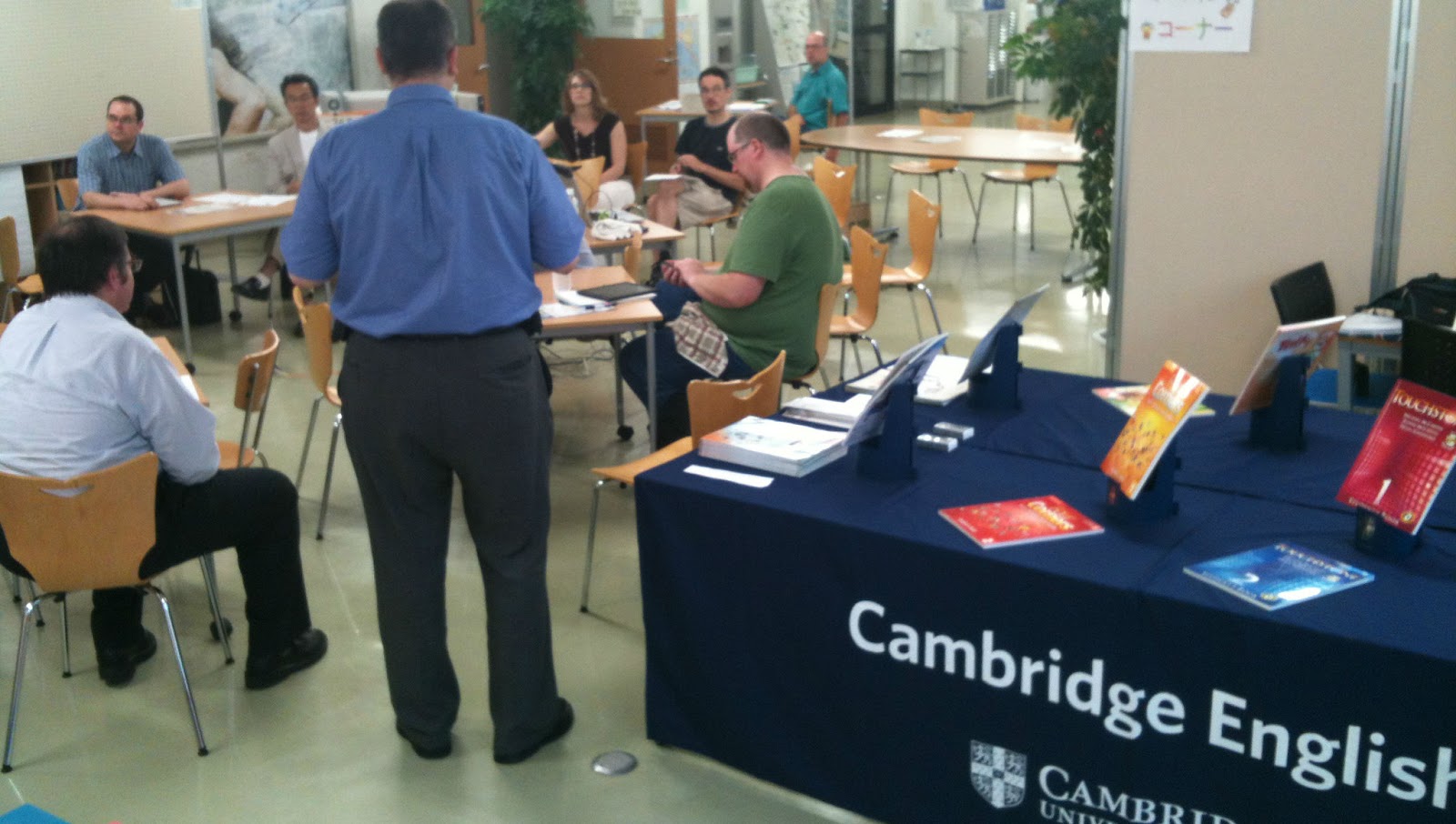
Shinshu JALT and apps for the classroom


 As Programme Chair for Shinshu JALT, I had asked Cambridge
University Press to sponsor an evening
of professional development for our chapter on Saturday evening.

You can find a full description of that presentation by Asia Senior Sales
Manager Rob Habbick right here. As I have personally known Rob for
over 15 years, it was a pleasure to finally get him up to

Matsumoto again in his professional capacity and to share his wealth of knowledge & catalogue of
online tools with us (Rob & Ritsuko Nakata presented our very first Cambridge YLE certicates to
our children back in 2000 - a very good friend of Luna's!). Rob gave everyone plenty to think about, as
well as codes to access some online tools for free over the next fortnight.

The second half of our evening was given over to mini-presentations. I had intended this to be a mostly
local effort from new speakers; few answered the call despite Tonya Kneff's best efforts to rally the ALT
crowd. However, we had interest form further afield - Andy Boon came all the way from Tokyo to tell us
about Facebook...as he explains:
 
"As a global phenomenon, Facebook has established itself as the
de facto Social Networking Site. With its various utilities to connect
people via the Internet to  post messages and comments, start
discussion threads, upload photographs and videos, and chat
via IM or video, the pedagogic potential of this tool to encourage
and facilitate language learner  use of the L2 outside of the
classroom setting is being realized by educators worldwide. In this 
short presentation, we will provide an overview of how setting up a Facebook group with a 
2nd-year intermediate university class in Japan has enabled group members to interact with one 
anther by posting and responding to comments to work on course assignments or just to say hello 
to classmates in English. Data from the Facebook group will be provided to highlight activities 
that may be of use to other educators wishing to set up Facebook groups with their own classes."


Mike Honywood teaches at Shindai in Ueda, and awed us all in 
presenting an app he developed to help second language learners. 
Obviously a labour of love and a lot of fun, Mike's presentation 
explained not only how his app works but how he got into making it, and
the technological changes that are making that challenge less 
complex/more exciting and accessible to non-programmers.

Our Chapter President Mark Brierley went retro with an egg timer app
and a quick round of "Just a Minute" - audience challenged to avoid
hesitation, deviation & repitition
on the topic Spain v Italy. Yours truly won, leaving a late challenge with 3 seconds left to talk about the
football tonight!

Fred Carruth (our Membership Chair) explained what an EBM
(Executive Board Meeting) is & what happened at the last one in
Tokyo,  last weekend. Fred is retiring as Chair of the Presidents' Liaison
group after 4 years, where he has helped keep Shinshu on the map.

Dave Callaghan demonstrated an app (SayHi) that claims to
automatically translate
between about 45 different languages. Given Dave's demonstration there is very little
chance that any of the participants will be using this or any other auto-translate app any
time soon.

Me? Of course I have loads of ideas of apps & iOS solutions for classroom hiccups! I
demonstrated two which I had to use earlier in the day. Snapguide and Sock Puppets. I used Snapguide for the first time earlier this morning, when a student asked me for assistance in preparing for a video conference call she was to be involved in next week. This is what we came up with.I think you will agree it is clear and simple? It was very easy to make, with the app on my iPhone following a simple template, with photos very easy to incorporate and annotate. The voice recorder is a cool tool if you are not hands free eg hands covered in chocolate or something! I love to use Sock Puppets to enliven dialogues - there's a 30 second time limit (on the free version) which is just fine...encourages students to hurry up & allows us to have to have another go! Students also tend to let go of their books to touch (activate)/move their character around the screen.  You have a choice of characters & backgrounds, props. I think it's great, and our students love using. Check out this sample - it has lost some lustre in rendition :(


Friday, 15 June 2012

Team reading - first draft


listen to ‘New trainers on Friday’ on Audioboo

I am not a big fan of 'team reading' - tends to be at the speed of the slowest and 'pronunciation by consent'. As you listen (press play) you can hear that the children get quicker & more 'into' the material. You can't hear me moving my arms around like a windmill to gee them up!

This did help me fogure out which words they needed a bit more focus on (which ones did you identify?) and we did just that next with a board race. After that, I read it through and made some atrocious mistakes ('cow' instead of 'now', hungry/angry, nappy/happy, mad/sad, daddy/dirty etc) which was mildly entertaining and increased the volume significantly.
Image representing AudioBoo as depicted in Cru...
Image via CrunchBase

What iOS apps do you use to get more out of your classes?

Check out some other experiments with my AudioBoo here

Find this recording/download it at http://audioboo.fm/boos/847176-new-trainers-on-friday