Showing posts with label edtech. Show all posts

Saturday, 14 August 2021

Elementary, my dear Taisei: digital native "Can Do"

 I can totally talk about my family, and manage all the #edtech AND make a load of creative + editorial decisions on the fly, under time pressure...give me a job!

Unfortunately, Taisei is still at elementary school, but he could do a hell of a job for any number of businesses locally & trample any staffroom of high school teachers that I know of!

A young man's presentation that uni students would stuggle to beat (time taken, artwork - no eraser! -, diction and confidence, editing skills)...


Tuesday, 10 August 2021

Talking about my family...Sawa says


Sawa loves to draw, and loves to talk - I KNOW she is going to be an English teacher when she is a little bit bigger!

Here she grabbed Jim sensei's iPhone & monstered the tech to make this multi-faceted interactive presentation in no time at all. Asking really smart questions about 'how to' with intuitive ideas about what she thought she should be able to do (eg add an icon/change the colour of the background/switch sides...).

Love using students' native talents to produce a complete package - artwork, digital skills, digital navigation, decision making, composition, voice, reading skills...and a topic we all love to talk about ;)

***And a non-humble brag from Jim = he used to teach Sawa's grandmother (thank you former Young Australian of the Year - now Professor Belinda Tynan for introducing us!); grandpa brings her to class every week and they say "hello"... her older sister has been his student since she was tiny and he's worried she's going to be taller than him by the end of this year! Definition of Luna's Family!

Friday, 6 August 2021

This is my family: Riku


Taking advantage of Riku's lovely drawings of his family members, we used Adobe Spark Video (iPhone app) to put his commentary together - I say "we"... I showed him where the buttons/tabs/options were & he dived into creative mode like the digital native he obviously is! ("Get out of the way, Jim!").

Riku has recently joined us at Luna, and I could see his shoulders going back as he gained confidence from doing this 'first' in our group. I think you'll agree this is an awesome little project?!

Wednesday, 13 January 2021

Recycling a song - and avoiding having to sing?!

What do you do with a young learners song, after they've sung it once?


Milk it to death!

An idea sprang to mind - Adobe Spark Video - as a way to recap/replay/rework one of the songs from our Young Learners' text book (Everybody Up Starter from OUP). Chicken, fish, rice & beans works very nicely as a back and forth (question and response), and it's easy to switch parts half way through. So we did. I like this exercise as it gets the students to read the words - a catchy tune helps them bounce it along with proper intonation as well.

The #Edtech a bit too much for my little learners to manage alone, but they were very quickly directing me what to do - how to spell things, which icons or images they wanted, and counting each other in to record their panels, and putting panels in the correct order. Then they decided when they'd recorded their voices to their own satisfaction (after practice goes) and completed with big smiles.

Adobe Spark Video is great for this kind of 'challenge', as the sections are ideally short, and you can re-record until you are happy to move on. Looks great, seamless transitions, and piece of cake to do on your iPhone or iPad.

Your welcome!

Wednesday, 15 April 2020

Sockpuppets on inventions


To celebrate getting to the end of our text book, we had some fun with one of my favourite older apps "Sockpuppets". The free version works fine (but I seem to have lost a load of purchases/usability) and the outcome for Miyu & Aoi was very satisfying! Round of applause!

Friday, 6 March 2015

Chewing the fat - reflecting on Aurasma

              You’ve heard us rave about how brilliant Aurasma is and what an asset it has been to help “upgrade” our school. However, it hasn’t been all smiles and rainbows. There's been a lot of hard graft and careful planning going on behind the scenes. Even so, there were things that managed to slip past us or failed to take into consideration. So, with hindsight now on our side, here’s a run down of things which we would have done differently, plus some unexpected obstacles we stumbled across while putting our project together. You can also see a video summary if you feel so inclined.

            One of the biggest issues we came across was image recognition across different devices and tablets. There were a multitude of factors at play: poor camera quality, bad lighting, small drawings with faint lines and lack of colour. This lead to Aurasma having a little difficulty picking up some of our trigger images. Not ideal when you want to show off in front of eager parents after building up a lot of hype, then for it to not work at all. We heavily advise using images as large as possible with a combination of thick lines and bold colours. Don’t worry too much about the finer details, make sure it stands out.

            Also make sure that you spread out your pictures. For our birthday calendar, some months are more popular than others in terms of the number of birthdays. You only need to take one look at March to see it’s chock-a-block with students. This presents another problem for our trusty app; since the pictures are so close together, it sometimes detects an image other than the one you are currently focusing on. It’s a pain in the neck when the video you want to watch is interrupted by Jim’s self introduction instead (just as a hypothetical example of course).

            Another problem which came apparent towards the final stages was that parents, especially mums, had a hard time getting close enough to the drawings with device in hand. Some having to resort to climbing on the sofas in order to reach high enough! This was overlooked during the planning phase as we were primarily more concerned about fitting the display in the room, and out of reach of curious fingers. Me and Jim being over average height probably had something to do with it too. Definitely something to bear in mind when making your own Aurasma display. Defeats the purpose of having good content if nobody can reach/access it!

            Following on from the idea of accessibility, something we had to overcome on the job was making our content available to parents and visitors alike. As mentioned in a previous post, you must be following the creator’s “channel” on Aurasma in order to access their Auras. We weren’t actually aware of this when we first started, so you can imagine our bewilderment when Aurama didn’t work for any of our students or parents. The demonstration process would go smoothly, until the part when we got them to try using their own devices. At the time I put it down to devices with poor camera quality, but after many similar incidents, myself and Jim put our head together to fix our dilemma. With a little help from one of our students, Hikoro, and some trial and error, we managed to solve the mystery. We made an instructional video on how to “follow” a channel so nobody would have to suffer what we went through.


            So that concludes our first step into the realms of augmented reality. It feels as though we have only just dipped our toes into a vast ocean of endless possibilities. We look forward to using Aurasma more in the future, really immersing ourselves into the digital age and adding an extra dimension to the language learning venture. 

Monday, 2 March 2015

Pronunciation and misunderstanding; is it me?

I thought I had figured out how to maximise student participation with Quizlet, in & out of the classroom, but I happened across another cool angle during the week.

Students finishing tasks quickly while their buddies are still working presents the teacher with a micro management problem; give them a new task that will overlap? Let them kick their heels and wait? Doing a quick task on Quizlet on an iPad is a solution - extra practice or review on related vocabulary for example, without having to relocate (to a PC). It's quiet, so not about to distract the others, but looks fun and encourages to others to hurry up & potentially have a go too.

Working with full phrases (rather than single words) also brings in punctuation - capital letters, apostrophes, spaces - to simple spelling. Typing takes time, counter-intuitively, as learners are not familiar with a keyboard layout. Still, a relevant skill to acquire.

This is where the "Aha!" moment arrived, though (I was trying to help from upside down & failing!) Use the mic and dictate the response.

And then the fun started, as the programme's interpretation of what it had heard produced other than what the students had said. Or thought they had said. Their reaction = the iPad must be deaf, or it can't spell, or it's just stupid ("We've said the same thing 5 times already, and it is wrong again!").

I let them keep trying until it was obvious there was quite a bridge missing. Students' pronunciation (elision or not, hard consonants 'missing', misplaced stress, false starts, intonation?) and my acceptance/perception of their usual utterances (ie my ear tuned to them & our shared context) perhaps allowing less than ideal output? The software second guessing utterances into grammatical structures (with no contextual base, obviously!) - its initial interpretations did 'adjust' as the speaker finished a phrase...

English: logo of quizlet
English: logo of quizlet (Photo credit: Wikipedia)
"You do it then!" was the 'we've had enough'
and to their satisfaction, my attempts were equally mangled!

So, what's the problem?!



Thursday, 19 February 2015

Augmented calendar - Luna's wall of names

So in the previous instalment, I spoke about what Aurasma actually is and how it works, leaving you all with a bit of a cliff hanger. This time round I will make good on my promise and demonstrate how we have integrated the app in our learning hub. Time for the “Tourasma” Don’t worry, what we’ve used it for isn’t as remotely lame as my puns.
            You may have already seen our “Rationalefor using AR in school”  and “Howto” videos (really recommend watching these as it shows our finished product) if you frequent our blog. I will be going into a bit more detail of the ideas touched on in the first video, plus the process of our journey with Aurasma. Also, there will be more videos to follow so make sure you subscribe to Jim’s YouTubechannel so you don’t miss out on any more future content.
            So the moment you’ve all been waiting for. Jim’s big idea. We needed something to brighten up the empty wall space in our waiting room, plus we wanted a way of remembering all of our students' birthdays. But we didn’t want just your typical run of the mill birthday display, we went all out for an interactive birthday calendar, with the help of Aurasma to bring it to life.
            Having settled on an idea, we got to work on our new project. Jim did the donkey work of making a lovely calendar with everyone’s names and birthdays tagged on. There was a fear of a lack of wall space, but a bit of ingenuity from Jim and we just about squeezed in all 12 months. The next step was adding the Augmented Reality. Let the fun commence!
            As we wanted this to be a student orientated project, we counted on them to provide us with some good quality content. We set about drawing self portraits, accompanied with a video recording during lesson time. Self portraits are fairly self explanatory, but for the videos we tried to add some spice and variation. We recorded some of our young learners playing a game or singing a song, with the older ones building up to a short self introduction using familiar language. For teens and adults, we had a bit of fun getting them to record and interview each other as an alternative to a monologue self intro.
            Having assembled all the pieces to our puzzle, all we had to do was put them all together, with Aurasma being the glue. We added everyone’s drawings to the calendar in order to create their “Auras” (If you don’t know how to make your own "Aura", you can read the previous blog post or watch the how to video) A lengthy process overall but well worth the effort. What we are left with is a display that shows what our students get up to during lessons, what they are capable of and how much fun they have, on top of serving as a birthday calendar. It’s a great feature for when we have visitors, as it allows them a peak at what goes on in ALL of our classes. Can’t come to observe one our classes due to time restrictions? No problem, you can have a look at what those students get up to with our birthday . The look of shock and wonder when parents and visitors alike see one our students pop up and their device and starts talking/singing never gets old.

We had a blast putting together our project and we would highly recommend you trying something similar. I will be following this up with another post on some of the difficulties we faced, and things we would do differently with a little hindsight. If you would like to see the display yourselves, don’t hesitate to swing by Luna to witness the magic of Aurasma.

Tuesday, 17 February 2015

Rationale for using AR in school

School owner Jim George explains what he wanted to achieve in his language school's waiting room, that would really impress visitors and parents - by having a roomful of cheerful learners hanging around on the walls 24/7, introducing themselves and singing songs etc.


Thursday, 5 February 2015

Augmented Reality (AR) - introduction to Aurasma

Have you heard of a really cool app called “Aurasma”? I used to be one the unfortunate souls who had no idea about the magic of Aurasma, until Jim kindly stepped in and enlightened me. So one cold December afternoon Jim calls me into his classroom as he has something to show me. He tells me to point his iPhone at a large drawing of Father Christmas on the wall. I was dumbfounded by what followed, I suspected witchcraft. The drawing came to life as an animated version of Santa popped up on the screen and began singing. After racking my brains, all I could muster was “How?” Jim, looking quite smug my reaction, then proceeded to fill me in on the magic of Aurasma.

The secret to Aurasma is that there are 2 key components; a video overlay and a trigger image. The video overlay can be anything you want, something you have recorded on your phone, any video format created through another app such as SockPuppets or ChatterPix Kids, even record something on the fly directly through Aurasma. Simple. On the other hand, setting up a trigger image can be a little trickier, especially if the resolution on your older phone camera isn’t up to scratch. The app is rather clever and is able to recognise images/drawings/patterns, and can then store them in its memory to be used as a trigger. Through experimentation, and getting fed up with spending more time than I would care to admit waving my iPhone around without much success, larger images with distinct outlines and plenty of colours helps with the recognition process. Having a steady hand doesn’t do any harm either.

Once you have prepared your overlay and set your trigger image, the final step is to combine them. Once you have made an “Aura”, you have the choice of making it private, which will only allow your phone to view your Auras, or public, which will enable followers of your Aurasma profile to access your content, as long as they have your Aura trigger on hand.

Now that you’re up to speed with Aurasma, you might be starting to form some ideas yourself on how to implement it into a learning environment. It was on the forefront of our agenda for a while too, and thanks to a bright spark idea from the man himself (Jim), we found a pretty cool way to show off our students’ work. His idea? Well, what I can tell you that is that you should tune in next week, where I will reveal our big idea to make Luna a truly interactive school. Watch this space! For the time being you can have a sneak preview of one our Auras starring Taisei.


Sunday, 20 October 2013

Using Quandary in an FCE reading prep class

 I came across an online game called Quandary a few days ago via @dkapuler - someone very well worth following on twitter if you are into that kind of thing & have an interest in #EdTech (useful technology & tools that can be used in the classroom).

I quickly realised I should try it out with my young #FCE students, who enjoy a change of pace and revel in a challenge. They also relish the chance to compete with each other, but being brothers this can often be hard to achieve with a level playing field. Getting them to read quickly is a bit harder...

The premise of the game is that the player is the captain of a crew, who have just arrived at a far flung planet & begun to colonise it. The crew/settlers are diverse bunch with a predicatble range of opinions which the player needs to take into consideration as he/she moves through scenarios. Each scenario requires the player to read (can also listen to the information) about a particular situation, then tap into the community's opinions and make a decision about a course of action; then fine tune that decision with more information and take stock of a core of opinions selected from the larger group.

The player scores points along the way, according to how well they have categorised opinions or matched potential outcomes to predictions...and the outcomes do vary, depending on the choices made by the player along the way. I will ask my players to offer their own feedback on the game soon (hopefully they are exploring a few more levels for 'homework' this weekend).

I liked this activity because the game is not too wierd or requiring role play into dungeons & dragons territory. The premise is simple, the scenarios realistic and the moral dliemma's presented are everyday & believable: the outcomes are not judgements on the player's character either, more a hint that they did not take heed of the right opinions or make such smart decisions, given the information available.The information is just heavy & involved enough, and the range of opinions given requires re-reading & ranking, sifting for nuance & a setting aside of personal bias.

Once familiar with the chain of events as a scenario unfolds, my lads quickly became independent and jumped into the next situation. We have 2 PCs in the classroom so they could do this real time against each other both in terms of time taken & points accumulated (also found they were not on the points leaderboard at the end), which dampened the triumphalism (Yes, there's more than just you two in this mire!) while I could keep track of where they were & ask a few questions of my own along the way.

I will be coming back to www.quandarygame.org the next time we have a 'too tired to think' evening. Games in class? For me, gamification is not a dirty word if used well - hoping it will encourage my learners to engage with more reading out of class. Their moral compasses are pretty sound, but never hurts to give them a polish every now & again!

Monday, 19 November 2012

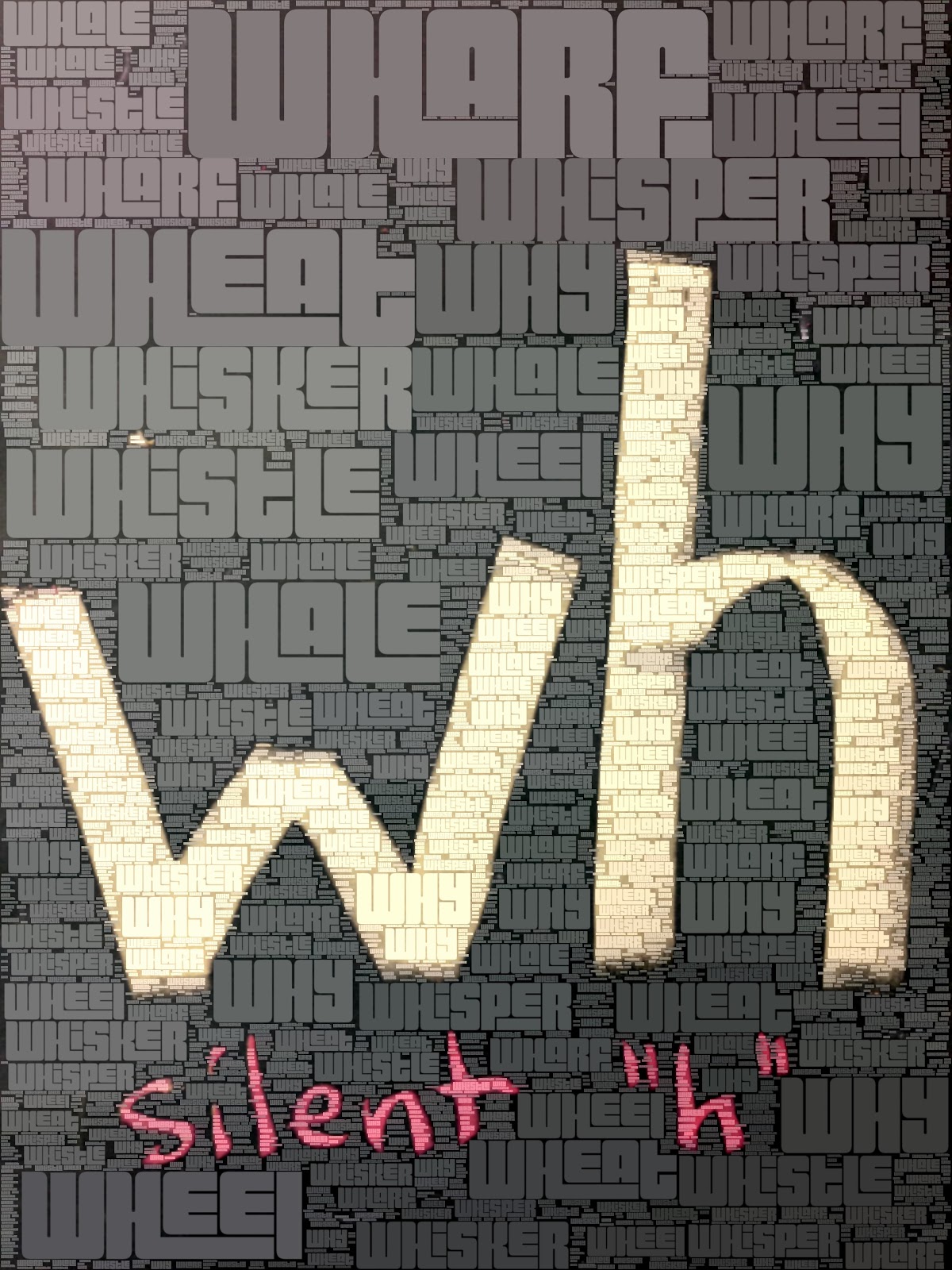
WordFoto - now you can read a photo

 To be perfectly honest, I was scratching my head in a one to one class recently, with a very bright young lad wading through his (not ours) phonics book. It's a very dry affair; each page unimaginatively the same as the last, minute line art pictures as mysteriously unfathomable as they are hard to see.

There has to be a way to make this a bit more interesting, I was thinking to myself. I didn't want to make a list on the board (lazy, and just the same thing again). I thought about a mind map, but we've done that before.

Brainwave: WordFoto (find it here) app

I wrote the big 'ph' in fat chalk on the board + 'sounds like /f/' & took a quick picture. Then opened up the picture in the wordfoto app. There's a grey toolbar across the bottom.
  • crop the pic if necessary; I wanted it nice & tight.
  • words - tap this and then select "add a new wrod set >". add each word you want to see in the image as a new item
  • style allows you to find a treatment of your picture you are happy with - pre-set transformations of your image as well as adding your word list in different fonts (compare ph set vs wh set below)
  • finetune - does exactly that!
When you are happy with that, you can save to album or export to Facebook or by mail.

NB The images are not intended to be definitive lists of all the words in the English language with ph spellings as /f/, or wh with a silent h.  What posting to FB did was generate a blizzard of suggestions though (and some nice exceptions - shepherd & haphazard).

Now I can save these images to my YLs Evernote dossier too, for future reference. How have you exploited WordFoto? Would love to know!
.


Wednesday, 10 October 2012

Message in a bubble


This is one of my favourite photos, from class a few weeks ago. The boys were being really rubbish and not joining in very well; Airi & Katsumi got stuck in and sang their own verse to a chant we'd been playing with. I found this cool photo app through twitter - it is so easy to use and a lot of fun. Anyone else want to share theirs here?

Tuesday, 18 September 2012

Guided writing from graded reading - watch the movie!

Yuta is a spacedude
by: lunajim

Back from space, Yuta describes his planet

Yuta & Jim worked up this conversation from his Red Planet graded reader...good job, I think?!

Wednesday, 12 September 2012

Spicing up the dialogue with returnees - slow it down!

Apologies about the accent with the character one the left (interviewer); memo to self = preview before publishing (and avoid accents on Xtranormal - they are thick & heavy).

Summer Holiday interview
by: lunajim
Hana & Suzu mash it up in Luna's YLE classsroom

My returnees can fly through a conversation on everyday topics in a very haphazard and blazee attitude; quickly, relevantly, but with very little thought/development beyond answering the question as fast as possible. That leaves me scrabbling to diagnose 'what happened' & sourcing more material  to develop the conversation...bored students, frustrated teacher, progress little. In flying through their exchanges my students realise their goal of saying "finished" as quickly as possible; how often do you say thay in a meeting, phone call or chatting with granny?

Kids love cartoons, and using the keyboard is a profound playing leveller - certainly in Japan; few kids here are fluent typists. This inevitably slows things down - mini aim - so that we can focus on getting the nuts & bolts right. Not necessarilly spelling for a conversation (but we are typing it so why not in the process of making sure we get the words in the right order?)

My kids also have a habit of clock watching (in this class); in this situation the clock is on my side the entire time. The conversation they are working up was in note form from last week, and they want to stretch 'my' time into an hour. So, short ansers won't achieve that goal - make the answers longer/detailed! In doing this, also means the director can add more movement/camera shifts/noises/poses etc. Students edit each other much more readily than softly softly teacher, so we have peer learning/teaching going on too (much more likely to take note than to me). As we get towards the top of the hour there's a 'hurry up' factor & a desire to see the finished product.

The xtranormal site needs a minute or three to 'cook' i.e. render the video...you'll have to wait until next week to see it in class :)  Oh, the antici----pation!

Friday, 31 August 2012

We sang an Audioboo - and had a ball!

listen to ‘I have a ball!’ on Audioboo

What do you think of our singing skills? We think we are pretty funky (actions and everything!)

Tuesday, 21 February 2012

Quizlet - a powerful learner's tool

 Last week I wrote about this class and the importance of taking a break/blowing off steam.

This week, the flip-side of the coin = letting them get on with some powerful self-propelled learning! We have 'learned' the long /a/ sound/spelling rule, and exhausted the text book & workbook examples.

I ("Lunateacher") recently made a large set of flashcards on Quizlet featuring the long /a/ sound, and sat the boys down in front of a PC each. I was curious to see how long they would remain interested...turned out I had to drag them away before they gave themselves a headache!

They were variously challenged with the set - to match words to pictures, true/false, dictation, against the clock. Working alone and able to 'make mistakes' (I really like the inbuilt correction functions) the boys were powerfully motivated and engaged.

Why don't you try it out yourself?


Thursday, 21 July 2011

Using Voicethread with graded readers

It is possible, if you work frantically, to have a full scale Voicethread production of a graded reader, such as OUP's Story Tree orange level one seen here, up and published in an hour.

We did not get into this 'cold'. Students have been asked to listen to the CD and to read along at home. This is not homework as such, but our efforts at an extensive reading programme. A book a month is a very gentle commitment I think!

We have also 'milked' this source heavily - it is full of verbs in the past tense - regular and irregular - which we have worked on previously eg using a word cloud to retell the story as best we could & to find the verbs in their past form > write the present tense form. We have also identified how to pronounce the three different /ed/ endings (from the CD).

I gave my boys the camera and asked them to find some of the main 'ingredients' in our story. Those things we couldn't photograph we drew quick pictures eg museum & shop. The students were assigned characters to speak for (reading ahead skills) and then Jim's quick keyboard skills were needed to find the right images/press record etc. We were against time pressure so we did not go back and edit - so what you hear is very much what we did. Pauses are there when someone wandered off thinking they'd finished!

Image representing Edmodo as depicted in Crunc...Image via CrunchBaseI hope you'll take a few minutes to follow the link over to Voicethread and leave a comment yourself for us (or leave us a note here). Personally, I think this is a lovely (free) tool that teachers should be able to exploit easily for this kind of personalisation. Involves everyone in a production that would otherwise stay 'hidden' in the book. Performing brings out the characters and imagination, and a lasting finished product is something they can share & go back to with pride. All our classes work is linked for parents to discover on Edmodo too, which if you have not thought about using for classes yet, I'd take a look. We love it!


Wednesday, 13 July 2011

Gadgets in class

A stack of the iPods I now own... included are...Image via WikipediaA tweet from @markbarnes19 last night caught my eye. "ROLE Reversal: Why aren't we using gadgets in class?"

Here is the link to the article - http://resultsonlylearning.blogspot.com/2011/07/why-arent-we-using-gadgets-in-class.html which asks a simple question: as 75% plus of children are using iPods etc, how come teachers aren't?


SAN FRANCISCO - SEPTEMBER 09:  Apple CEO Steve...Image by Getty Images via @daylifeMy own experience at a high school in Japan is that students' own tech is forbidden in the classroom - phones are actually collected up and locked in a cupboard in the teachers' room. I asked if we could engage the students using their phones to write each other messages (in English, as part of our writing course) and was looked at with a mixture of condescension and horror...the foreigner asking extremely dumb questions again variety of look. So, the chances of getting their gadgets out are very remote indeed. And there goes a fabulous opportunity to engage the students on their terms. 


Another year of students will graduate without realising the wonderful potential of the technology at their fingertips - beyond gaming and MP3 players. Fail.


Do we use gadgets at Luna? Not as much as I'd like - I would personally like to see all of our learners using apps, songs, audiobooks etc on iPod Touches, but the expense is a big ask in the current economic climate. We do use our own iPhones/iPads to showcase certain apps that we like/recommend, and they are genuinely useful and educational. Sadly, a lot of teachers are technophobic/still got chalk in their hands...